Poweramp Music Player
- 4.1
- Rating
- 50.00M
- Installs
- Free
- Price

 Analysis by App-foxy
I spent time with Poweramp Music Player as a local music app, and the feature that shaped my experience most was its equalizer. Plenty of music players include a few sound presets, but Poweramp is built around the idea that listening should be adjustable rather than fixed. That makes it especially interesting if your headphones, car speakers, or phone sound different from the setup used by the person who mastered your favorite album.
Poweramp is a free Music & Audio app from Poweramp Software Design (Max MP). It has been around since November 1, 2010, and its current release is build-1025-bundle-play. The app supports Android 5.0 and later, carries an Everyone age rating, and offers optional in-app purchases ranging from $0.49 to $8.99 per item. Its large user base, with over 50 million installs, suggests that it has remained relevant in a crowded category, while an average rating of 4.1 from around 1.4 million ratings gives a more useful picture: many listeners value its depth, but it is not a universally effortless player.
Why the equalizer matters more here than in a basic player
The main appeal is not simply that Poweramp has an equalizer. The important difference is how much of your listening experience can be shaped around it. A basic player usually asks you to choose something like “Rock,” “Pop,” or “Classical,” then leaves you with little control. Poweramp makes more sense for someone who has noticed that one pair of headphones sounds too sharp, a car system lacks body, or older recordings feel thin compared with newer ones.
You May Also Like

 Blood Strike: 2.5 Anniversary
Blood Strike’s Loadouts Turn Every Drop Into a Tactical Gamble
A close look at Blood Strike’s custom loadouts: how fast access to signature weapons reshapes its battle royale rhythm, rewards preparation, and narrows the gap between fights.

 Pandora - Music & Podcasts
Pandora’s Music Is Easy to Start, but Harder to Recover
Pandora’s strength is its low-effort path from a seed to a station. Its weak spot is how much confidence it asks you to place in connection, setup, and quiet recovery.

 8 Ball Pool
 Is Built on Rivalries, Rematches, and Routine
A close look at the rivalries, rematches, shared routines, and unanswered safety questions that turn a quick pool match into a persistent mobile community.

 Samsung Music
’s Quiet Strength Is Playing What You Already Own
Its reach comes less from spectacle than from dependable access to a personal library. That simplicity is both the app’s strongest retention engine and its ceiling.

 AccuWeather: Weather Radar
AccuWeather Review: A Quick, Clear Forecast for Everyday Decisions
For everyday plans, the best forecast is the one you can understand quickly. AccuWeather makes rain timing, radar, and local conditions easy to act on, with a few trade-offs.

 Hill Climb Racing
Why Hill Climb Racing Still Turns Crashes Into One More Run
A tiny car, a bumpy hill and one more upgrade: Hill Climb Racing keeps resurfacing because its simple chaos makes every near-miss feel personal.
More From Our News Desk
View All News


In my experience, the equalizer is most useful when I treat it as a correction tool rather than a way to make every song louder or more dramatic. A small adjustment can make vocals easier to follow during a commute, reduce tiring high frequencies on bright earphones, or give low-end instruments more presence without turning the whole track into a muddy rumble. The result depends heavily on the earphones and the recording, so there is no single “best” setting. That is actually one of Poweramp’s strengths: it does not force one answer.
The bass boost is tempting because it produces an immediate effect, but I found that restraint works better. Raising bass too aggressively can mask kick drums, guitars, and lower vocal details. I prefer making a modest change, listening to a familiar song, and then checking a different recording before keeping it. A setting that improves electronic music may make acoustic music sound swollen. Poweramp rewards that kind of comparison instead of pretending one adjustment fits everything.
The practical benefit is control over your listening setup, not a magical improvement to every recording. If your hardware already sounds balanced and you never change headphones, the difference may be minor. If you rotate between a phone speaker, wired headphones, wireless earbuds, and a car stereo, the ability to tune playback becomes much more valuable.
Building a setting that survives everyday listening
I would begin with a familiar song that contains vocals, bass, cymbals, and quieter passages. That gives you several reference points at once. I would change one area at a time, keep the adjustment small, and listen at a normal volume rather than judging everything at an excitingly loud level. Loudness can make almost any change seem better for a short time.
Another useful habit is to check the same adjustment with several albums. A polished modern production may already have strong bass and bright detail, while an older recording can react very differently. If your setting only works for one album, it is probably too extreme. Poweramp is capable of detailed tweaking, but that does not mean every slider needs constant attention.
I also found it helpful to make the player part of a routine rather than a weekend project. When I switch from earbuds to a car system, I can listen for the specific weakness of that setup instead of randomly changing several controls. The car may need less bass than expected because the cabin already emphasizes it. Earbuds may need a gentler top end. These small, situation-based changes are where the app feels more useful than a generic preset list.
What using it feels like day to day
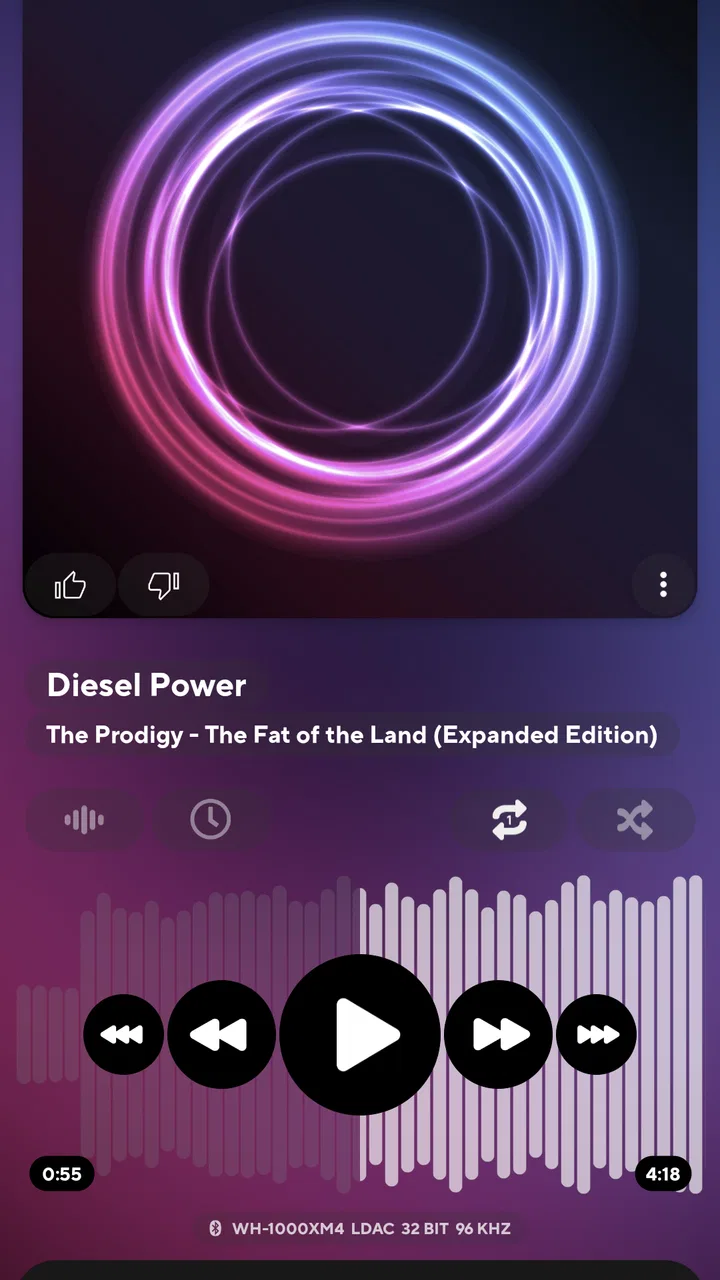
Poweramp feels designed for listeners who want to inspect and refine playback. That can be satisfying, but it also means the interface may feel more involved than a simple player whose main job is to show albums and start music. I did not see the app as something I would hand to a person who wants zero decisions. Its appeal grows when you enjoy adjusting sound and organizing playback around your own collection.
The app works best when I already know what I want to hear. I can use it for an album, a personal collection, or a carefully chosen queue without treating it like a discovery service. That distinction matters. Someone mainly looking for recommendations, social listening, or a large streaming catalog may be happier with a streaming platform. Poweramp’s identity is much closer to a dedicated Android player for people who care about how their existing music sounds.
That local-player focus also changes how I judge it. I am not expecting it to replace every music service. I am expecting it to give me more say over playback than the standard player that came with a phone. On that narrower goal, it makes a convincing case.
The best everyday scenario: switching between headphones and a car
A realistic use case is a person who listens during a morning commute. At home, the same tracks may sound comfortable through headphones, but the car introduces road noise, cabin resonance, and a different balance between vocals and instruments. Instead of accepting one compromise setting, I can adjust the sound for the car and then return to a gentler headphone setup later.
The useful workflow is not to chase maximum bass over traffic noise. I would first make speech and vocals easier to follow, then check whether the low end still has definition. If I raise everything, the music may become louder without becoming clearer. A careful equalizer adjustment can make the important parts of a track easier to hear at a reasonable listening level, which is more useful than simply turning up the volume.
This is also where the app’s learning curve becomes worthwhile. After a few listening sessions, I know which changes help my equipment and which ones only sound impressive for a minute. A person who uses several listening devices can build a more consistent experience than they would get from leaving every system at its default sound.
Where the control becomes a burden
The same flexibility that attracts enthusiasts can slow down casual listening. If I only want to tap an album and forget about settings, Poweramp can feel like more player than I need. The equalizer invites experimentation, and experimentation can become endless if I keep adjusting instead of listening.
There is also a risk of correcting the wrong problem. If a recording is poorly mixed, a playback adjustment may hide one flaw while creating another. If headphones are uncomfortable or a phone speaker is physically limited, software cannot turn them into a different class of hardware. Poweramp can shape the signal, but it cannot remove every limitation of the source or listening device.
Another trade-off is that sound preferences are personal. A setting that makes my earbuds easier to enjoy may sound dull to you. I would not copy someone else’s configuration blindly, even if it was created for similar music. The right approach is to use other people’s suggestions as starting points, then judge with recordings you know well.
The app’s free availability makes trying it straightforward, while optional purchases between $0.49 and $8.99 per item mean that some extras may involve spending. I would approach those purchases only after deciding that the player’s detailed control fits my habits. There is little reason to pay for deeper customization if I am satisfied with a simple player and rarely touch audio settings.
Poweramp compared with the usual alternatives
Compared with a phone’s built-in music player, Poweramp is the more appealing choice for someone who wants a serious equalizer and bass control. The default player usually wins on simplicity: fewer decisions, less setup, and a shorter path from opening the app to hearing music. Poweramp wins when the default sound does not suit your equipment or when you want playback to feel more personal.
Compared with a streaming app, the difference is even clearer. Streaming services are generally better for finding unfamiliar music, following recommendations, and moving between a large online catalog. Poweramp is better suited to listeners who already have music available on their Android device and want to focus on playback quality and adjustment. If discovery is the center of your routine, this may not be the right replacement. If your main complaint is that your own music sounds inconsistent across devices, its approach is more relevant.
Compared with a minimalist local player, Poweramp asks for more attention but gives more room to tune the result. That is a fair exchange only if you will use the control. I would choose the simpler alternative for a family member who wants obvious buttons and no audio experimentation. I would choose Poweramp for the listener who keeps noticing differences between headphones and wants a practical way to address them.
Small habits that make the equalizer more useful
- Start with familiar recordings: use songs whose vocals, bass, and treble you already know instead of judging a new track.
- Change one area at a time: this makes it easier to understand whether a setting improves clarity or merely increases excitement.
- Check at normal volume: a louder signal can seem better even when detail has become less balanced.
- Test more than one style of music: a bass-heavy adjustment may suit electronic tracks but overwhelm acoustic recordings.
- Revisit the setting after a few days: what sounds impressive immediately may become tiring during a longer listening session.
These habits are not complicated, but they prevent the most common mistake with a flexible equalizer: making dramatic changes before knowing what problem you are trying to solve. The app gives me the tools; it does not decide whether a change is musically sensible.
Who gets the most from this player
I think Poweramp is a strong fit for Android listeners with an existing music collection, more than one listening device, and a genuine interest in sound adjustment. It is particularly useful if you have headphones that sound too bright or too weak in the bass, if your car system changes the balance of familiar tracks, or if the standard player leaves you with too little control.
It is also a good choice for someone who enjoys learning through small experiments. You do not need to be an audio engineer, but patience helps. The best results come from listening carefully, making modest changes, and accepting that not every track needs the same treatment.
I would skip it if my priorities were music discovery, a social streaming experience, or the absolute simplest interface. I would also skip it if I never notice differences between playback devices. In those cases, a basic player or streaming service may be more convenient and may better match the way I listen.
The app’s Everyone rating makes it broadly accessible, and support for Android 5.0 and later covers a wide range of devices. Still, accessibility in the age-rating sense does not mean the interface will feel effortless for everyone. Its real audience is defined less by age and more by curiosity about playback.
My final take after focusing on its strongest capability
Poweramp stands out because its equalizer and bass boost are not decorative additions to a basic player. They change the way I can adapt music to different hardware and listening situations. When used carefully, that means clearer vocals, more comfortable treble, or better-defined bass without relying on one preset for every album.
Its weakness is the same feature viewed from another angle: there is more to manage, and poor adjustments can make music worse. The app cannot compensate for every recording or device, and it is not the natural choice for listeners who mainly want recommendations from a streaming catalog.
With an average rating of 4.1 from roughly 1.4 million ratings and more than 50 million installs, Poweramp has clearly found a substantial audience. My own recommendation is narrower but positive: if you want a dedicated Android music player and care about tailoring sound to your headphones, car, or phone, it is worth exploring. If you want music to play with no setup and no interest in audio controls, its depth may feel unnecessary. For the right listener, though, Poweramp Music Player turns the equalizer from a forgotten menu into a practical part of everyday listening.
FAQs for Poweramp Music Player
01What audio formats does Poweramp Music Player support?
Poweramp Music Player supports a wide range of audio formats, making it a versatile choice for music enthusiasts. Popular formats include MP3, MP4/M4A (including ALAC), FLAC, WAV, APE, WV, TTA, MPC, and AIFF. This extensive support ensures users can enjoy their music collection without the need for conversion.
02Is Poweramp Music Player customizable?
Yes, Poweramp Music Player offers extensive customization options. Users can choose from a variety of visual themes and skins, adjust the equalizer to their liking, and create personalized playlists. The app’s intuitive interface and versatile settings enable users to tailor their listening experience to their preferences.
03Does Poweramp Music Player work offline?
Absolutely. Poweramp Music Player is designed to play music stored locally on your device, so you don't need an internet connection to enjoy your tunes. This makes it ideal for users who want uninterrupted music playback on the go, without relying on streaming services.
04How does Poweramp Music Player enhance sound quality?
Poweramp Music Player enhances sound quality with its 10-band optimized graphical equalizer, separate Bass and Treble adjustment, and stereo expansion. It also includes features like mono mixing, balance adjustment, and a reverb effect, allowing users to fine-tune their audio to their exact liking.
05Is there a free version of Poweramp Music Player?
Poweramp offers a free trial so users can test its features before purchasing. The trial version provides full functionality for a limited period, allowing users to explore the app's capabilities. After the trial ends, a one-time purchase unlocks the full version, granting unlimited access to all features.
Pros
- High-quality audio playback.
- Extensive equalizer options.
- Supports various audio formats.
- Customizable UI themes.
- Gapless playback feature.
Cons
- Complex settings for beginners.
- Paid app after trial period.
- Limited cloud integration.
- Resource-intensive on older devices.
- No native podcast support.

Poweramp Music Player
Gallery